

By Bexley Terrell
15 Mar 2024 · 14 Min Read
If you keep up to date with the latest Google news, the chances are you’ve heard about Performance Max Campaigns. But what exactly are Performance Max Campaigns, and how does this feature benefit advertisers?
In short, Performance Max allows advertisers to control their campaigns on a more granular level, combining Google’s automation features to help advertisers drive performance based on their individual goals and consumer preferences.
Let’s dive in and find out more about this innovative offering from the search engine giant.
What is Performance Max?
Performance Max is a campaign type that spans the entirety of Google’s product suite: Youtube, Display, Search, Discover, Gmail, and Maps. It is the first campaign type to communicate customer signals across all of Google’s properties, allowing it to more accurately bid for customers at the times and touchpoints that prove most profitable.
What does it do?
For example, Performance Max may discover that a particular customer is likely to be more profitable on Search than on Youtube, so it will bid higher for that customer on Search and lower on Youtube.
This cross-property visibility reduces instances of overbidding on touchpoints that are likely to be less profitable and underbidding on touchpoints that are likely to be more profitable, leading to more targeted campaigns and a higher chance of reaching your target audience.
How does it work?
The Smart Bidding technology that powers Performance Max Campaigns already exists within individual campaign types.
It’s the communication of customer signals between these properties, under the roof of one campaign, that allows such effective optimisation. This ‘all under one roof’ approach also minimises the chance of attribution being lost as a prospect moves between properties.
How to set up a Performance Max campaign.
1. Create a new campaign and choose your goal.
- Log in to your Google Ads account.
- Choose Campaigns from the page menu on the left.
- Click the plus button and select New campaign.
- Choose an advertising objective for your campaign. If none of the goals fit what you’re looking for, you can select Create a campaign without a goal’s guidance.
- Confirm the conversion goals for your campaign. The goals for your account will be prepopulated by default, but you can edit them or add new ones.
- Select Performance Max as your campaign type.
- Enter a campaign name.
- Select Continue.
2. Set your budget and bidding.
- In the "Budget and bidding" section, enter the amount you want to spend per day.
- Scroll to the “Bidding” section and select a bid strategy.
- Conversions: If the checkbox for “Set a target cost per action” is selected, the campaign will try to meet the Target CPA you enter. Learn more about Target CPA bidding.
- Conversion Value: If the checkbox for “Set a target return on ad spend” is selected, the campaign will try to meet the Target ROAS you enter. Learn more about Target ROAS bidding.
- Select Next to go to “Campaign settings”.
3. Add location and language.
- Choose the place you'd like to target from the list of locations on the "Campaign settings" page.
- Choose Enter another location, type the location's name, and then choose Target or Exclude.
- Under “Languages”, select the language you want your ads to serve in.
4. Build the asset groups.
- In the “Asset group” page, enter an asset group name.
- Build your asset group by adding images, logos, videos, headlines, long headlines, descriptions, CTA and URL options.
- Add ad extenstions.
5. Publish!
Go forth and publish your masterpiece :)
What are asset groups and how do they work?
A group of creatives with a common theme and audience is known as an asset group. To put together all of your ads and create an inventory for all applicable ad formats for your advertising objective, you use the creatives from your asset group.
To generate ads that appear on Google Search, Google Maps, Display, YouTube, Gmail, Discover feed, and Google partner websites, one asset from an asset group can be mixed with any other asset from the same group.
To organise assets by theme or to group assets with different targeting, you can establish multiple asset groups for each campaign.
What to consider when setting it up.
Sort your different asset groups based on comparable themes and audiences. Base your asset groups on the sections, categories, or themes that appear on your website. The sections or categories of the products that show on your website should serve as the foundation for your asset groups.
Keep in mind, that one or more videos will be automatically created from the assets in your asset group if you don't add one yourself.
You can utilise the Google Ads video creation tool to produce a video for use in your Performance Max campaign if you don't already have one and don't want to use one of the automatically generated ones.
We usually recommend not using the automatically generated ones as these tend to be very low quality!
What are the Performance Max asset requirements?
Performance Max assets refer to the images, logos, headlines, videos, and descriptions you add when you create a campaign.
The PMax asset requirements are quite specific and unique to PMax campaigns, so they’re well worth familiarising yourself with before you get started. A few things you should know.
- There’s a minimum required number of assets of different types that you must have before you can work on your PMax campaign.
- Assets can be generated automatically using machine learning and AI.
- Assets are grouped together in Asset Groups. This feature is unique to PMax campaigns and isn’t seen elsewhere in Google’s suite of features.
Minimum asset requirements.
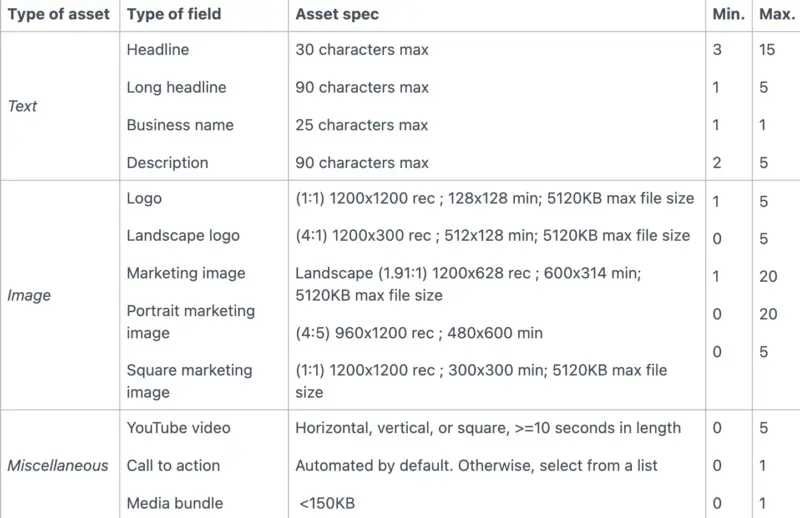
Each PMax campaign requires a minimum set of assets to begin with. You can either upload new assets specifically for the campaign or use existing assets from other campaigns.
If you link a retail PMax campaign to Google Merchant Center, the campaign will generate the minimum number of assets automatically. Here’s a table outlining the requirements for each type of asset within a campaign.
What are asset groups?
Asset groups are a collection of assets, and each campaign requires at least one. The assets within an asset group are a collection of assets centred on a particular theme or related to a particular audience. You should sort your different asset groups based on comparable audiences and themes as well as the categories that appear on your site.
These asset groups are then used to assemble all of your ads and build an inventory of assets for all applicable ad formats relating to your objectives. Assets are automatically mixed and matched depending on which Google Ad channel your ad will be shown on.
What are audience signals?
Audience Signals is the part of the asset group, where we inform Google of who we are aiming to target.
However, please be aware that they are not rigid limitations but rather guide Google on who to target, and then Google combines this with its AI learning to find the most suited user who is likely to convert.
Audience signal structure.
Audience signals consist of the following:
- Search Themes
- Your Data
- Interests & Detailed Demographics
- Demographics
Search themes.
In simple terms, these are your keywords for your asset group.
Treat these like a Search Campaign.... What would your keywords in your ad group be? These make up your search themes. If the asset group is broad - add broad search themes. If the asset group is more specific - add in specific search themes.
Your data.
This is THE most important part of the audience signal. It is where your previous customer data goes, which Google uses to find similar people to your existing customers.
Here are a list of data segments we like to use:
- Total website visitors (90 days)
- Product page website visitors (90 days)
- Total purchasers
- Specific product purchasers
- Top 25% of spenders
Automatically generated assets.
One of Google’s PMax automation features is additional assets generated by machine learning. If you don’t add a video to your Performance Max asset group, for example, then video assets can be generated automatically from the assets in your asset group to make sure you meet the minimum requirements.
If you don’t want auto-generated videos to make up part of your Performance Max campaign, upload your own custom video instead to replace the auto-generated videos. We recommend this course of action since the automatically generated assets aren’t always up to scratch.
Top tips for Performance Max campaigns.
Need to optimise your PMax success? Try our top tips.
Upload a wealth of assets.
Performance Max works best when you upload as many assets as possible, so work in videos, images, headlines, and more to allow PMax to perform successfully. Adding more assets will also increase the chances of an ad being eligible to serve across multiple forms of inventory.
Plus, this way you’ll avoid having to use the automatically-generated assets, which we’ve found can be pretty low-quality. Even one poor-quality video that’s been automatically uploaded by Google can put the success of your campaign at risk.
If you only plan only running Google Shopping campaigns, use your feed instead of assets, but don’t forget to optimise it with keywords for the best results.
Consider copy.
Assets like videos and images are absolutely important and shouldn’t be overlooked as part of your campaign. The written content, however, is equally as important. With the human attention span on the decline, keep your copy straight to the point and simple.
Choose the right bidding strategy.
When you launch a Performance Max campaign, you’ve got two bidding strategies to choose from. You can either maximise conversions to get the highest number for your budget or maximise conversion value to get the highest value conversions.
If you opt for the latter, you might get fewer conversions, but according to Google, they’ll be higher value. There’s no right or wrong decision here - it mostly depends on your goals. It’s worth experimenting with both strategies to see which gets the best results for you.
Make the most of your asset groups.
Always organise your asset groups by a common theme or audience group, similarly to how you’d organise your ad groups. Structure your groups in a way that makes sense for your organisation. You could choose to separate them by the products or services you offer, for example. Want to see your conversion rates soar with a little helping hand?
Here at Bind Media, we eat, breathe, and sleep paid media, and there’s nothing we don’t know about optimising your campaigns for success (not to brag, but we’ve got a few awards to show for it, too).
Asset group testing.
Once you have set up your asset groups, it’s not a case of set-and-forget. It’s a case of set-and-test.
The audience signal part of the asset groups is great for segmenting and testing. This is a case of duplicating your asset group and then testing a specific part of the audience signal. Very similar to how you would test multiple adsets in a Facebook/ Meta Ads campaign. We would segment and test the following asset groups:
- Full detailed audience signal
- Your Data Only
- Interests only
- Search Themes only
- Feed only
Then run for a month duration, analyse the results, switch off what didn't work and then make further variations of the winning asset groups and scale from there.
Optimise your Performance Max campaigns.
The limited reporting and control are some of the biggest criticisms of this campaign type, and its lack of transparency makes it hard to know how to effectively optimise your Performance Max campaigns.
However, we now have the option to see asset group performance. This can be seen under the asset group tab and selecting “Table” rather than “Summary”.
This is great for reviewing how each asset group is performing which can lead to running tests and further improving your campaign's performance. From results that our peers in the industry have shared, and our own experience with our clients, we have discovered a few key elements that can make or break your P. Max experience:
- Creative - The creatives in your asset group are one of the biggest factors that you have complete control over and high-quality banner ads/images will go a long way to increasing performance.
- Copy - Like the asset group creatives, the copy is an essential factor that you can control. You should be direct and always include your major selling points.
- Video assets - Although Google does not actually require video assets in the asset groups, we strongly advise you include at least one. Without a video asset, Google will auto-generate low-quality videos from your image assets that could be the spanner in the works of your entire Performance Max campaign.
- Shopping feed - Your shopping feed is the final piece of the puzzle, and it should be well optimised for your keywords to see the best results.
Review your clicks vs number of conversions.
When you are in the main overview section of your P. Max campaign, go into your insights and from there scroll down to the section where you can explore search terms that your ads appeared for. We want to look for which search terms or search categories are generating the most clicks and then compare to which ones are generating the most conversions.
A cause for concern would be if your search terms that are generating the highest number of clicks were not generating any conversions. If this is the case for you, go into your asset groups and find the audience signal which is targeting this keyword, go into the 'custom segments' section and then 'edit' and remove any keyword themes from your audience signals that are not profitable.
Review your locations.
Next, you want to go into your 'Locations' segment and look for any areas that have a high cost but low conversion or a low conversion value, and from there exclude locations that are not proving to be profitable and use this budget on other higher performing locations.
If you'd prefer to not exclude underperforming locations, we are able to put more budget focus on better-performing locations by hovering over the pencil in the bid adjustment column, pressing edit and then adding in extra bid adjustment.
This does not only increase the bid but also gives another signal to Google to let them know you want to focus more on these areas.
Review your placements.
This is a report of where your ads have been placed. One of the worries for advertisers is that they would lose control over where their ads appear once they have access to the entire Google inventory.
This is no longer a problem according to the updated placement report. The report provides information on where ads are presented as well as how many impressions each ad has.
First off, this improves performance. If advertising isn't showing up on a specific platform, you can investigate further to find out why. Additionally, even just understanding this information will benefit the company's other efforts.
Second, from the standpoint of brand safety, this is significant. After all, no company wants its advertisement to be displayed next to offensive or questionable material. As a company, you want to appear on the most positive content and steer clear of any controversy. Even while the new feature has received positive feedback, it is sad that the report only provides data on ad placements and impressions.
This data isn't available, therefore anyone looking to gauge performance is out of luck. Therefore, click data cannot be viewed alongside impressions and placements.
Adding negative keywords in Performance Max.
[Updated: September 2024] Google's negative keyword exclusion update
[Google has announced that later this year, they will launch campaign-level negative keywords in Performance Max.
It's been a long time coming!
This means marketers will no longer have to complete a form or ask a Google account manager to add negative keywords. You will have more control over negative keyword exclusions and how your ads appear, ensuring better alignment with brand and audience preferences.]
Currently, there is no easy way to add negative keywords in your Performace Max campaigns, however, it IS possible if you go through Google support.
Send a support ticket with the following message and they should add the negative keywords in for you relatively quickly:
"On behalf of my company, [your company name], I give Google my approval to make all of the following types of modifications in the Google Ads Account [your Google Ads account number] without first notifying me: Please associate the negative keyword list named "[your neg keyword list name]" to the campaign named "[your Performance Max campaign name]". Many thanks"
When should I test Performance Max?
A Performance Max campaign should be tested if you meet the following criteria laid out by Google:
- You have specific advertising and conversion goals (e.g. driving online sales, lead generation, etc.).
- You want to maximize the performance of your campaign and aren't limited by which channel your ads appear on.
- You want to easily access all of Google’s advertising channels using a single campaign.
- You want to get additional reach and conversion value beyond keyword-based Search campaigns.
If the above applies to you, and you have enough creative assets to build out your asset group, you are ready to start testing! The audience signal part of the asset groups is great for segmenting and testing. This is a case of duplicating your asset group and then testing a specific part of the audience signal. Very similar to how you would test multiple adsets in a Facebook/ Meta Ads campaign.
For e-com, we would recommend segmenting and test the following asset groups:
- Full detailed audience signal
- Your Data Only
- Interests only
- Search Themes only
- Feed only
Then run for a 4-week duration, analyse the results, switch off what didn't work and then make further variations of the winning asset groups and scale from there.
Performance Max vs Smart Shopping.
How does P. Max differ from Smart Shopping?
Performance Max campaigns are built on the foundational technology present in Smart Shopping campaigns, and we, as an agency, have seen great success using Performance Max for our E-Commerce clients. There are, however, two major differences between these campaign types.
Performance Max campaigns operate across every available Google property, the first campaign type to offer complete property-wide ad serving and customer signal communication.
The second difference is that the Ad and Product Groups of Smart Shopping will be replaced with Asset Groups.
An Asset Group is a collection of headlines, descriptions, images and video (optional but recommended) that your Performance Max campaign will dynamically use across Google properties.
Asset Groups should represent a certain theme or audience and be linked to a listing group ie. a group of products that you offer.
New features of Performance Max 2023
Google is regularly adding in new features to the Performance Max campaign type based on the feedback users are giving them. Below are the newest features Google has added:
- Account-level negative keywords: Add negative keywords at the account level to help you maintain brand suitability and exclude traffic you don’t want to reach.
- Campaign-level brand exclusions: Control which brands your campaign matches to—including your own brand.
- Page feeds: you are now able to upload a feed of page URLs to refine your results when using the final URL expansion.
- Pmax experiments: Use experiments to see how adding a new Performance Max campaign to your current campaign mix drives additional conversions or conversion value.
- Video creation tool: Use the video creation tool right in the Assets section of the Performance Max campaign workflow to easily create high-quality video assets.
- Budget pacing insights: Budget pacing insights will roll out in the next few weeks and help you automatically uncover opportunities to optimize your budget and performance.
More details can be found here.
Performance Max in Search Ads 360 and Google Ads Mobile App
New customer acquisition in Performance Max will be rolled out across other campaigns and advertisers will be able to optimise and set different target ROAs for new customers or choose to only bid on new customers. This goal will allow you to either bid more for new customers compared to existing customers or to focus your optimisations on new customers only while maintaining your cost efficiency.
Our thoughts & case study
Field Doctor Smart Shopping Vs P. Max Case Study
FieldDoctor is an ambitious health food startup with a focus on strong revenue growth and maintaining a healthy CPA. Our commitment as an agency to stay ahead of the curve in a rapidly evolving industry, coupled with their drive to grow, led us to test a Performance Max campaign. Our main benchmark was the performance of a Smart Shopping campaign which ran through February 2022.
The P. Max campaign ran the following month. Compared over an equal time period, the Smart Shopping campaign achieved a ROAS of 3.71, whereas the Performance Max campaign reached an impressive 10.94 (a nearly 200% increase). The CPA figures are just as one-sided, with Smart Shopping hitting £18.10 per conversion and P.Max £5.10 per conversion (a decrease of 72%).
To really illustrate the effectiveness of P. Max, let's assume both campaigns spent exactly £574.22. In this scenario, Smart Shopping would have earned £2,130.36, but P. Max would have generated £6,279.00. As profitable as the campaign proved to be, it is important to point out the drawbacks that we experienced.
Performance Max will take priority over other campaigns for any search terms that are not an exact match. Because of this, we saw a slight decline in our brand campaigns as P.max soaked up searches that were broad or phrase match. To mitigate this, we made sure all of our brand keywords were an exact match.
This allowed us to keep our brand traffic as separate as possible for more accurate measurement and to more accurately judge the effectiveness of Performance Max.
Our Bind team member Bexley’s thoughts

We asked one of our paid media managers what he thought of Performance Max Campaigns. This is what he had to say.
‘I’ve been testing Performance Max across a number of my client accounts and have experienced great results! I recommend using the asset groups to segment your audiences.
This gives you more visibility over the performance of different audiences. I’d recommend testing Performance Max to almost all businesses, but it works particularly well within E-Commerce.
If you are interested in testing it out but are worried that it might affect your other campaign performance, you could test the campaign on a particular set of products or to a particular geography in order to isolate the test.'
Our final verdict
While Performance Max Campaigns offers an innovative upgrade to Google’s offerings, there are some drawbacks. The reporting is limited, and since Performance Max takes priority over other campaigns for any search terms that are not an exact match, you’ll need to ensure all of your brand keywords are an exact match.
Disadvantages aside, our case study found that using Performance Max yielded a ROAS increase of nearly 200%, proving that if you use it wisely, it’s a profitable tool.
The Smart Bidding technology allows advertisers to spend their money more wisely, bidding higher on only platforms that promise a return on investment.
All in all, Performance Max Campaigns allows advertisers to maximise profits with a granular approach to advertising that takes into account consumer patterns and preferences.
Feel free to reach out to us for your free proposal.

About the author
Bexley Terrell
Hey there, I’m Bexley and I'm the Creative Strategy Director at Bind Media, where we take care of all things UGC, consumer behaviour and data-driven testing!
Essentially, my job enables me to utilise both my creative and analytical skills while working with a diverse range of clients.
🎵 Favourite Artist: Sleep Token
🎉 Hobby: I’m a vocalist in an Alt Rock band

